Posts

Showing posts with the label junit

Code generators vs AI Assisted Coding

Code generators vs AI Assisted Coding The Historical Significance of Delta Learn Java and get the Oracle OCP Certification Today, AI assisted coding is changing the way software is designed and developed. Tools can generate code from natural-language instructions, automate repetitive programming tasks, and help developers work at a higher level of abstraction. But the underlying idea is far from new. Long before generative AI, there were technologies designed to let programmers describe what an application should do while automatically generating much of the how . One of the most significant examples was Delta , an early industrial-scale COBOL and PL/I code-generation technology developed for enterprise and IBM mainframe environments. Emerging in the 1970s, Delta was created at a time when large business systems were dominated by COBOL, PL/I and mainframes. Enterprise applications could contain enormous amounts of repetitive code, particularly around data processing, files, databases...

AI-Assisted Coding with Eclipse: A Developer’s Guide to OCP Certification

Image
AI-Assisted Coding with Eclipse: A Developer’s Guide to OCP Certification Learn AI-assisted Java coding using Eclipse    AI-assisted coding is changing how Java developers work. But the value of AI is not just generating code faster. The real advantage comes from combining AI with an IDE that lets you immediately inspect, compile, test, debug, and refactor the result. For developers working with Java and preparing for OCP Certification , Eclipse provides a strong environment for exactly this workflow. Eclipse and AI: A Practical Combination Eclipse already brings together the core tools Java developers need: code completion, Java compilation, debugging, testing, refactoring, navigation, and project management. Add AI-assisted coding and the workflow becomes more powerful. AI can suggest an implementation, explain an unfamiliar API, generate test cases, or propose a refactoring. Eclipse then gives you the tools to validate and improve the result. The important point is sp...

Why Java Oracle OCP Certification Matters for IT Professionals

Image
Why Oracle Certification Matters for IT Professionals Learn Java and prepare for the OCP Certification Oracle Oracle technology is deeply embedded in the enterprise world. In fact, Oracle solutions are used by 7% of Fortune 500 companies —a useful reminder of just how much critical business infrastructure depends on Oracle expertise. For IT professionals, that creates an obvious question: how do you prove you have the skills to work with it? One answer is Oracle certification. More Than a Certificate An Oracle certification is designed to validate practical technical knowledge, not simply prove that you completed a course. Depending on the certification, candidates may need to pass exams, complete training, or demonstrate their skills through performance-based assignments. The result is a credential that can demonstrate that you understand Oracle technology and can apply that knowledge to real-world problems. More than 2 million professionals worldwide have earned Oracle...

What is imperative and declarative programming

Image
What is imperative and declarative programming Learn Java   Imperative programming is a programming style where you tell the computer exactly what steps to perform, and in what order . Think of it like giving someone a recipe: Get some flour. Add water. Mix them. Bake the mixture. In programming, you might write: x = 5 y = 10 sum = x + y print(sum) The program executes these instructions sequentially: Store 5 in x Store 10 in y Add x and y Store the result in sum Print sum Key characteristics Imperative programs commonly use: Variables — store changing data Assignment — change the value of variables Loops — repeat instructions Conditionals — choose which instructions to execute Functions/procedures — group instructions together Statements — individual commands that change the program's state For example: total = 0 for i in range(1, 6): total = total + i print(total) Here, total changes state as the program runs: 0 → 1 → 3 → 6 → 10 → 15 ....

Building Cross-Platform JavaFX Apps with Gluon

Building Cross-Platform JavaFX Apps with Gluon If you love JavaFX for desktop development, you’ll be excited to know that Gluon takes it a step further—bringing your JavaFX applications to mobile and embedded devices with minimal effort. Java Bootcamp   What Is Gluon? Gluon is a powerful suite of tools and libraries that extend JavaFX to run seamlessly across platforms—including iOS , Android , desktop , and even embedded systems . Its mission is simple: to make “write once, run anywhere” truly possible for JavaFX developers. Java Bootcamp Key Highlights of Gluon 1. Cross-Platform Support With Gluon, you can use a single JavaFX codebase to build apps that run natively on mobile, desktop, and embedded devices. This drastically reduces development time and maintenance effort. Java Bootcamp 2. Gluon Mobile Designed for modern devices, Gluon Mobile provides optimized UI controls and themes built for touch interaction—so your app looks and feels natural on smartphones and ta...

10 Great Facts About JavaFX

10 great and interesting facts about JavaFX JavaFX is a powerful toolkit for building modern Java-based graphical user interfaces (GUIs): 🧩 1. JavaFX replaced Swing as the official Java GUI library JavaFX was introduced by Oracle as the successor to Swing , providing a more modern, hardware-accelerated, and flexible UI toolkit. Since Java 8 , it became part of the JDK — although later it was decoupled and distributed separately. Do the JAVA Course 🎨 2. CSS styling support JavaFX allows developers to style UI components using CSS , similar to how web pages are styled. This gives you separation of design and logic — you can completely reskin an app without touching the Java code. Do the JAVA Course 🧱 3. FXML: XML-based UI layout JavaFX introduced FXML , an XML markup language for defining user interfaces. This makes it easy to design GUIs declaratively — and tools like Scene Builder let you visually create FXML files with drag-and-drop. Do the JAVA Course 🚀 4. Hardware-a...

JavaFX Course

JavaFX Course JavaFX Course Getting Started with JavaFX What Is JavaFX What is JavaFX? JavaFX is a software platform for creating and delivering desktop applications, as well as rich Internet applications (RIAs). JavaFX is intended to replace Swing as the standard GUI library for Java SE. Get Acquainted with JavaFX Architecture Deployment JavaFX Guide JavaFX Course Graphics Getting Started with JavaFX 3D Graphics Use the Image Ops API Work with Canvas JavaFX Course JavaFx User Interface Components Work with JavaFx UI Controls Create Charts Add Text in JavaFx Add HTML Content Work with Layouts Skin Applications with CSS within JavaFx Build UI with FXML Handle Events JavaFX Course JavaFX Scene Builder 2 JavaFX Scene Builder Overview. JavaFX Scene Builder is a visual layout tool that lets users quickly design JavaFX application user interfaces, without coding. Users can drag and drop UI components with Scene Builder. Get Started with JavaFx Scene Builder Working with Scene Builder Design ...

If I use JavaFX, do I also need JavaScript?

 If I use JavaFX, do I also need JavaScript Short answer, NO!!! Yeah!!! Java Bootcamp ➡️ JavaFX apps run entirely in Java — no JavaScript required, unless you choose to integrate web pages. 1. JavaFX uses Java, not JavaScript JavaFX is a Java-based framework , so all your application logic, UI control, and event handling are written in Java (or optionally Kotlin, Groovy, etc. — but not JavaScript). The UI can be defined with FXML (an XML file), which you connect to Java classes Java Bootcamp

What is more popular, Java Swing or JavaFX

 What is more popular, Java Swing or JavaFX That’s a great question!  Do the full course Short answer: There’s no clear verdict that one is definitively more popular than the other, because usage depends heavily on context (legacy systems vs new development). But we can summarise the trends: What the evidence suggests Do the full course Java Swing has been around a long time (it’s included in Java SE since the 1990s) and is very widely used in legacy and enterprise applications.   JavaFX is newer, designed as the “successor” to Swing, and offers more modern UI features (CSS styling, scene graph, richer UI controls).   For new GUI development , JavaFX tends to be recommended more often than Swing.   However, in the job market and in many existing applications, Swing still has a stronger presence (because many large applications were built on it and are still maintained). For example, someone on Reddit said: “A lot of the Swing dem...

20 Java Web Scraping Tips

20 Java Web Scraping Tips  1/20: 🚀 Want to learn Web Scraping with Java ? Let's break it down step by step! In this thread, we'll cover: ✔️ Setting up ✔️ Fetching web pages ✔️ Parsing HTML ✔️ Handling dynamic content Let's go! 🧵👇  Java 2/20: 🔧 Step 1: Set Up Your Project You'll need: ✅  Java  (JDK 8+) ✅ Maven or Gradle ✅  Java  JSoup (for parsing HTML) Add this dependency in pom.xml: <dependency>     <groupId>org.jsoup</groupId>     <artifactId>jsoup</artifactId>     <version>1.16.1</version> </dependency>  Java 3/20: 📡 Step 2: Fetch a Web Page Use JSoup to download a webpage in  Java : Document doc = Jsoup.connect("https://example.com").get(); System.out.println(doc.title()); This prints the page title! 🎯 4/20: 📌 Step 3: Extract Data from HTML Find elements using CSS selectors: Elements links = doc.select("a"); for (Element link : links) {     System.ou...

What is a Java Card Application?

Image
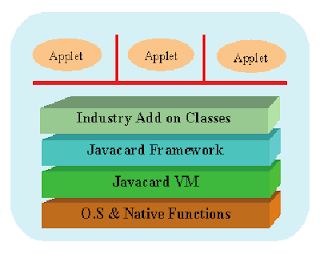
What is a Java Card Application? A Java Card application refers to software developed for  Java  Card technology, which allows  Java  applications to run on smart cards and other small-memory devices. These applications can perform various functions like authentication, secure transactions, and data storage, leveraging the security features and limited resources of smart cards. Java  Card development involves creating software applications specifically designed to run on  Java  Card technology-enabled smart cards and similar devices.  Developers use  Java  programming language and specific  Java  Card APIs (Application Programming Interfaces) to build applications that provide secure and portable functionality on these embedded systems.  Java  Card development typically involves tasks such as :  designing applets (small applications),  ensuring security measures are implemented,  optimizing performance ...

What is Java NIO (New Input/Output)

Image
What is  Java  NIO (New Input/Output)  Java NIO (New Input/Output) is a high-performance API introduced in JDK 4 that serves as an alternative to the standard Java I/O API.  It offers enhanced features for networking and file handling, providing a more efficient way to perform  Java   I/O operations compared to the traditional  Java  I/O system.  Unlike the   Java  java.io package, which includes classes for standard input and output operations, the java.nio package focuses on buffer classes used across the   Java   NIO APIs.  Java NIO represents a second-generation I/O system with advanced capabilities for handling  Java   I/O tasks. Java  Buffers :  In  Java  NIO, buffers are used to handle primitive data types efficiently.  This package is designed with a buffer-oriented approach, meaning data is written to and read from buffers, which are then processed...

The Seven Different Types of Coding Blocks in Java

Java   Coding Blocks    In Java , the term "coding block" typically refers to a block of code within certain constructs that define the scope and execution context of variables and statements. There are several types of coding blocks in Java, each serving different purposes. Here’s an overview: 1. Method Block A  Java  method block is the section of code within a method. It defines the scope of local variables and contains the statements that make up the method. public class MyClass { public void myMethod () { // Method block starts here int localVariable = 10 ; System.out.println(localVariable); // Method block ends here } } 2. Class Block A  Java  class block is the section of code within a class definition. It contains the class’s fields (variables), methods, and nested classes. public class MyClass { // Class block starts here int instanceVariable; // Field public void myMet...

What is a Package in Java

Image
What is a Package in Java In  Java   , a   Java   package is a mechanism used to group related  Java   classes, interfaces, and sub-packages together.  Java   Packages help in organizing your code, avoiding name conflicts, and controlling access to classes and members. Here’s a detailed look at Java packages: Key Concepts Purpose of  Java Packages : A  Java   package contains many classes.  A  Java   package is a collection of classes.  A class is a collection of methods. A class contains many methods.  Organization :  Java   Packages help in organizing code into logical groups. For instance,  Java    classes related to user interfaces might be placed in one  Java   package, while those related to database operations might be in another. Avoiding Name Conflicts : By placing  Java   classes in different  Java   packages, you avoid naming conflicts....

How big is an int in Java

Image
Integer Data types in  Java   // 8 bits // -128 to 127 0000 0001 b = -128; System.out.println("b " + b); b = 127; System.out.println("b " + b); // short integer  in Java // 00000000 00000000 short s = (short)b; // 16 bit // cast from a number datatype to another number datatype s = 500; b = (byte)s; System.out.println("b " + b); // int in  Java // 00000000 00000000 00000000 00000001 int i = (int)s ; // 32 bit ; binary integer 0 1 ; 00000000 8 bits= 1byte // long integer in  Java // 00000000 00000000 00000000 00000000 00000000 00000000 00000000 00000001 long l = (long)i; // 64-bit // float in  Java // single-precision 32-bit // 0 and manitissa of 23 bits and exponent of 8 bits // 0.01234567900123456789012 x 10*12345678 float f = 0.0f; // double in  Java double d = 3048575658.00 * 728348716381.00; // double-precision 64-bit d = (double) f; // cast float to double double-precision 64-bit